Jobo GIGAone

Photography No Comments »

Have you ever been on a photographic shoot and run out of memory cards? Have you thought “I know – I’ll bring my laptop and download from the camera to that every so often…”? Have you tried that only to find that it takes a very long time to do and your camera is effectively out of action whilst you do it?

Enter the memory card reader with a built in hard drive!

There are several available on the market, including the excellent Epson P3000 or P5000 and these have a high quality built in screen for viewing your images. I imagine that you could use such a gadget to show ‘proofs’ to your client, but in my experience that is seldom necessary as they are too involved to pay much attention to your images there and then (especially true of weddings… the bride and groom seldom want to stop to look for very long on the day). Consequently, I opted for a Jobo Gigaone device. No viewing screen, just a screen to tell me the vital stuff such as battery life, capacity, operation and so on.

The version I got is a 40Gb drive in a snazzy silver case. It looks fairly good, IMO, and has slots for CF, SD, SM, MMC and MS cards. The CF slot also takes MD, too.

One thing that concerns me is the speed at which you can empty your memory card and get it back into action. I say ‘empty’ – in fact you only copy the content over to the internal drive and then return the card to the camera. You can then run a quick format to empty it. I have a couple of different sized compact flash cards which I use with my Nikon D200 and as a test I filled a 4Gb card to capacity and ran it through the Gigaone. It took about 25 minutes to copy the lot, which I guess is pretty acceptable – the files were all 15Mb RAW files. I reckon that’s a transfer rate of approximately 2.7Mb per second or thereabouts… I didn’t time it accurately or calculate the precise file size of all the images on the card. What I wanted was to find out if the time taken to empty the card allowed me to continue to shoot with a second card and not fill it up whilst waiting for the first card to be copied. It didn’t. I was using a 2Gb card as the second card and managed to fill it with RAW files faster than the Gigaone copied my 4Gb card. However, with two similarly sized cards I reckon you’d be about right. So that then leaves the battery life.

In the accompanying manual, the battery life is quoted as enough to copy 3.5Gb of data before you need a re-charge. This is complete nonsense, of course, and I can only assume it is a misprint. I copied the 4Gb card and the battery indicator still read as full. I copied it again, and then again. By the end of the third copy it was running low and I would have to re-charge it. Having said that, I did this test in the warmth and comfort of my own home, and in colder conditions (say winter time outdoors) you can expect the life to shorten. That said, a long time ago I invested in a power inverter (a device that allows me to run 13a devices from my car cigarette lighter socket) and if I was out on a location I’d take that with me.

The Gigaone has a USB connector on it which means I can easily attach it to my laptop and then read the images off it. Transfers are at USB2 speeds, which is nice. The device comes pre-formatted as FAT32 and popped up right away on my Mac. I assume the same would be true for a PC.

I’m using the device on a shoot in Yorkshire this week, so will no doubt have more opinions of it after that. So far I have been very pleased and wouldn’t dream of going out without it now! It has a space in the gear bag, and that’s that!
Nikon D200, Sigma 18-200, review

Photography 1 Comment »

Just a few words on this one, as I don’t actually have time to write a full review right now.

The Nikon D200 is an astonishingly good camera for the money. It feels solid, reliable and trustworthy in my hand, which can’t be a bad thing! The feature set is superb – very ‘pro’ level stuff in there – my current favourite time saver being the automatic ISO adjustment. I realise I ought to take more control over things than let the camera do it, but when in a rush, in low levels of light (or fluctuating levels on a cloudy day with sunny intervals) I just didn’t have time to keep re-setting it. Using the auto setting was a lot easier, ensured the images were exposed more appropriately and allowed me to use aperture priority rather easily.

The histograms are very good – colour charts help me to establish what is going on in the pictures before I get it to a computer, and enable me to effectively set the exposure where it needs to be.

Using a Sigma lens is nice as well – the lens responds quickly to most situations, although I do occasionally find it struggles to focus when using one of the outer-most focus points in the viewfinder. Using the  central set gives very few problems, so perhaps this is something any lens would struggle with… I need to test it more.

In practice, using this range of lens gave me all I needed for wider shots, portrait type shots and close ups on details… a Macro lens would help with the latter, but in all other respects this lens is a lovely compromise across a wide range of focal lengths. So much so, in fact, that I wouldn’t automatically carry many others.

So is the Sigma as good as the Nikkor counterpart? Hard to say without a scientific test, but apart from the VR capabilities on the Nikkor, I can’t see any real differences on most images – the Sigma performs well across a range of settings. I did get a touch of barrel distortion at the wider end of the scale, but in all honesty this could as easily have been down to the angle of the shot as much as anything else.

Since the camera body came along so reasonably priced, and the lens is a good performer, I can recommend folk this combination. Of course, don’t take my word for it – pop along to your nearest tame retailer and try them both out to see which you prefer. Shoot in RAW format, compare the images on a computer and see which you like best.

Talking of RAW – a 2GB Compact Flash card in a D200 will store about 120 images in RAW format from this camera. Don’t forget this is over 10 megapixels and files coming in to Aperture are regularly over 15Mb each. Shoot in JPEG fine and get hundreds of images… or JPEG normal and see the numbers grow – but I am preferring RAW format at the moment – it allows more possibilities for manipulation when on a computer.

Canon XL2 Camcorder

Cleveratom, Photography No Comments »

XL2 image

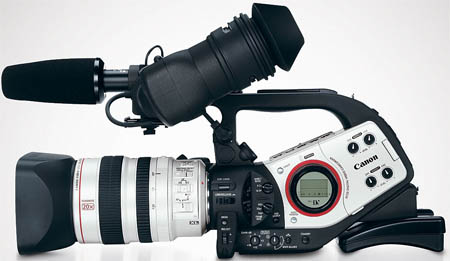
We have been very fortunate lately to be working with some excellent people. One such is Phil Sharp who works for Canon UK. Part of what we do is to undertake film and animation workshops around the UK, and occasionally get to do some filming for a wider project brief. Whilst at Ultralab we were fortunate indeed to have some pretty good kit to help us along the way, but at Cleveratom we have yet to purchase what we want/need. That’s where Phil comes in! He has arranged for us to have access to one and we have been using it on a project in the north of England.
Having a good camera like the XL2 for a few weeks (seemed like at least a month) really allowed us to get to grips with it’s capabilities. We were used to the ‘XL’ way of working, having had an XL1 previously. The XL2 has a much nicer interface and access to the common features is a lot more straight forward. Things like switching to 16:9 aspect ratio – on the XL1 this is buried deep in the menus… on the XL2 it’s a physical switch on the left hand side of the camera. The two XLR jacks on the back are a big improvement, as is the ability to switch easily into progressive scan mode.
So ok… it is not the newest of cameras, having largely been usurped by the HD trend. However, it is a great performing camera in the SD range, and I would buy one as soon as look at it. The lens is fabulous for the reportage style documentary work we have been engaged in, and whilst the camera is quite bulky, I like the solidity it offers.

Would I buy this over something like a Sony HVR Z1U? A tough call, since they are two different beasts, but I would definitely have one to hand if I could… and I’d have a sony as well :-)

Nikon D200, Cheap camera, Haggle for a bargain

Photography 1 Comment »

The title really says it all!

A short while ago I found myself in Bluewater in Kent, walking past what used to be Dixons – is it Curry’s Digital now? Anyway, I have been thinking about getting a new camera for a hwile now, and so on the off-chance I walked in and went to the counter. The conversation was brief, and to the point:

“Hi, I’m interested in buying a Nikon D200 camera, but I’m not interested in paying the shelf price for it”
“ha! OK, what did you have in mind?”
“Well, I’d have thought a good 10%…”
“Hmmm… well I can’t go quite that low, how about I remove £60 from the price?”
“Hold that thought – I’d like a moment to think about that”.

As it turns out, no-one else was able to come close to that, and a quick trip to the Apple store where you can log on to the internet proved that even Pixmania, KelKoo and other online price comparison sites couldn’t match that.

So, I bought it :-)

I guess the moral of the story is that if you don’t ask, you don’t get, but of course you shouldn’t go into a haggle believing that just because you want to pay nothing, the shopkeeper will give their stuff away.

So, I’ve been using the camera for a few days and I am very, very impressed. I love things like the automatic ISO adjustment – it’s the last thing I think about doing, so I now let the camera do it for me. I know, those purists and pro’s out there will be slating me, but actually, the results are quite good! The camera feels a bit heavy, but solid. There is an overriding feeling of capability when you hold a camera like this, and with a decent lens (I am still loving using my Sigma 18-200mm) you can’t really go too far wrong. I bet there are dozens of features I’ve not yet found, but it’s a great piece of equipment to spend time exploring.

Sigma 18-200 vs Nikkor 18-55, Nikon D50 lens, D50 with Sigma lens

Photography No Comments »

I was extremely pleased to receive another Sigma lens for my camera this week. I have been enjoying using the telephoto 135-400 lens but it is way too long for most day-to-day photography. As a result I’ve been relying on a Nikkor 18-55, but I’ve found the results to be very ‘soft’. Don’t get me wrong – they are perfectly adequate, but lack a degree of sharpness that the Sigma lens has got.

So, how does it compare?

First off, the sigma lens has a metal case which the Nikkor lens doesn’t. The added weight is somewhat reassuring, actually, but it is considerably heavier. If you are thinking that a lighter lens is better, stop reading now :-)

It comes with a petal shaped hood, but when this is in place it is tricky to get the lens cap on and off, since the release clips are at the very edge of the cap and not recessed into the centre as the Nikkor is. I find this a nuisance and much prefer the Nikkor system. However, the hood is easy enough to remove and does fit back onto the lens in a reversed position (whereupon the lens cap is easy enough to operate).

In use, the Sigma lens responds well. It focuses quickly and responsively, and at the shorter lengths really does give a nice crisp image. At the longer lengths, certainly over 150mm, the image quality tends to fall off very slightly. It isn’t dreadful, by any stretch, and even at 200mm it is producing some nice results. There just seems to be a hint of vignetting… maybe it’s me being overly critical, but you should check it out for yourself to see if it is OK for you.

Overall then this lens is a good piece of kit to have in your bag. It performs well throughout the range but is better at shorter lengths. The weight could be a factor for some, but the images are more crisp than the Nikkor ‘kit’ lens that comes as standard on a D50.

WP Theme & Icons by N.Design Studio
Entries RSS Comments RSS Log in