provisiondirect, buy video camera, camcorder purchase

BBC Blast, Cleveratom, Digital Creativity, General Comments, Photography No Comments »

Today I was caught up with the need to buy a decent camcorder and a few accessories. In the past we have used Sony HVR-Z1 cameras (the same used on the BBC Blast tour) which are well featured and durable, and produce great shots for video work. Sadly, they are now discontinued, and although there is a strong second-hand market for them, it is sometimes better to upgrade.

So up steps the Sony HVR-Z5. Almost identical, but with better optics, more considered ergonomics and additional settings in almost every feature it is a direct replacement and all of the Z1 accessories will still fit. This looked like the right piece of kit, but who to buy from? With almost every site in a google search for camcorders returning some price comparison or review site it is easy to find these things reasonably cheap (OK – £2,500 isn’t cheap, exactly). The thing is, they are mostly offered for sale with the standard one year warranty, and I had hoped for slightly more.

As usual, for all things video we call a select list of suppliers. Today we were delighted with the service from Jeremy at provisiondirect.co.uk. This company has an enviable reputation for great value and excellent product range. We have recommended them to clients looking to purchase kit, and indeed we have made one or two modest purchases there ourselves. Today was the day for buying again!

Jeremy is one of the most knowledgeable and friendly folk when it comes to pro and prosumer video gear. He is often very busy, but when you do get him, he finds the most brilliant pieces of kit for you, and tells you exactly ‘how it is’ with everything. After talking to Jeremy today I was satisfied that they still provide one of the best routes to buying kit, and the value he gives is second to none. So it was that we bought a Z5 with 2 year warranty at probably the most competitive price available. Not content with that Jeremy also added a few extras for us, which was brilliant… unexpected and not asked for. That’s the kind of person you are dealing with – full of information and very willing to help.

It is with great pleasure that I recommend to anyone looking to purchase a decent video camera, lighting, accessories, sound equipment, anything related to video, really provisiondirect.co.uk.

iPhone and Google calendars, sync Google and iPhone, Nuevasync

Cleveratom, Computer Tips, Mobile Phones, Reviews 6 Comments »

It is really not pleasant when you read that your iPhone will sync with Google calendars, and that iPhone software version 3.0 will allow you to have up o 25 calendars at a time, to find out that it actually doesn’t work as you think it might.

The instructions from our friends at Google are simple enough – use MS Exchange, add in your account details and you are good to go… but must first enable mobile devices in your Google dashboard (obviously this doesn’t apply to a personal Google account, only a business or academic one). In the instructions it lovingly tells you all will be well, but doesn’t mention what to do if all is decidedly unwell.

Every time I have tried to do this, I have managed to get my main default calendar only. It doesn’t matter if it is iPhone 2.0 or 3.0… still the same. And still the frustration mounts!

Having upgraded to version 3.0 today, I was fired up and ready to try a final time. Not easily put off when facing defeat, I tried for three hours, all to no avail. What a waste of time. I then read some other blogs and came across a third party service – www.nuevasync.com – and since it is free, decided to try it.

Lo and behold, after typing in the right details to Nuevasync, my iPhone shows ALL of my calendars, not just the general one. Glory be!

Now, if Nuevasync can do this, I’m pretty sure it is possible for Google to do it. I don’t see why we need a third party in the loop here, but for goodness sake, nobody let Nuevasync go out of business!

I now get to see all of my calendars in iCal on my phone, can add events and they sync to the main google calendar, add others, and have others add to my diary (yup, it’s a preference setting for work based calendars)… it ALL works as it should.

If you are as frustrated as I was, go to the Nuevasync web site, sign up for a free account and edit the settings. You’ll be running in about three minutes where before you were plodding.

Just be a little careful with your contacts and email though – if you enable these through Nuevasync, you *will* lose everything off your phone when the first sync happens. Be sure that you have got everything you need backed up, or in Google… or both!

School Design Awards

BSF, School Buildings, Cleveratom No Comments »

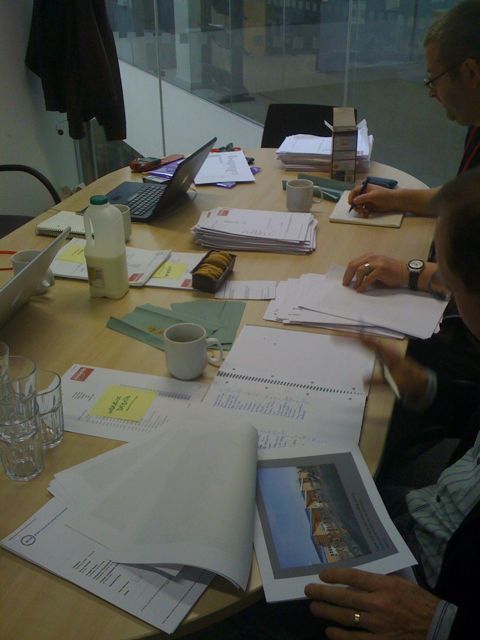
One of the nice things I am involved with is being part of the national school design awards evaluation panel. My job is to sift through the entries and comment on how well they have incorporated ICT for learning, and engaged the students as part of the stakeholder engagement process (clue here is the word ‘process’, as opposed to the word ‘event’!)

This year I can honestly say the quality of entries was exceptional. The eventual entries recommended to the final judges were each capable of winning outright. It is fortunate that we didn’t have to make that call!

The awards ceremony is to be held at the Emirates stadium in June and I am really looking forward to if! A chance to put on the black tie outfit, but also to meet the people behind the visions for each school.

The picture shows the evaluation in full swing. It was a tough day, but extremely worthwhile. I can’t say who the winners are (yet) but watch this space… Or the space on the BCSE website :-)

Anglia Ruskin Summerschool 2009

Cleveratom, Digital Creativity No Comments »

The beginning of May has been the time when Anglia Ruskin invite prospective students in to experience university life. Each year we have worked with them to run a mini project using digital technologies, and this year was no different.

The theme was ‘broadcast journalism’ as in previous years and our role was to lead the project and work with the students to teach them some of the skills for video capture and edit, presenting, camerawork and production. We also get to define the task, too.

This year it seemed obvious to have the group make a five minute news story on the impact of swine flu. Working in small groups the students were given a variety of tasks, such as gathering vox pops, researching the facts, organising the schedule and presenting to camera.

It was a tough challenge. From no experience whatsoever we expected the young people to create a news broadcast and present it live over the Internet by 3pm on the second day.

It is therefore a real delight to say that they did. It was a close call, but they rose to the challenge and managed to produce a very credible result. Given that this was their first ever attempt, and the time constraints are huge, I think the result is yet another example of the stellar performance of young people when given the opportunity to be creative. Getting the level of challenge right is incredibly important, but giving enough space for creativity to thrive is more so…

If you want to see the result, have a look on YouTube for Anglia Ruskin Summerschool 2009. I will link to that from here as soon as I can.

Google Calendar and iCal, sync calendars, team calendars

Cleveratom, General Comments 2 Comments »

Way back in 2001 I was introduced to TeamSoft’s ‘Team Agenda’ which was the calendering application of choice for the large team of 50+ people I was working with. It was lovely – I ran my own calendar, could check other people’s availability, ind free slots for groups to meet, know where resources were, who was using which room, and so on. And then along came Mac OSX and iCal.

With a far sexier interface, iCal promised to be the next best thing since… well, since Team Agenda. But it wasn’t. Not even close, unfortunately. At the same time, mobile phones were becoming the de facto standard too, and we needed a calendering application that did it all – team collaboration, phone integration and looked sexy. And by then, it also needed to integrate with iCal!

It seemed a little bit too much to get it all, and we tried several possible alternatives. The rather excellent Oracle Collaboration Suite (pretty sophisticated, way too complex for simple stuff) and even PHP iCal (which worked well, to a point).

Just recently I have been trying Google calendars and synchronising them both ways with iCal. That is, I can enter a date in Google online and it appears in my iCal, and I can enter a date in iCal and it appears in Google online. Doing this is actually very simple indeed!

You first need t export your ical calendar from iCal (use File/Export…) and you will get a .ics file in the location you choose. All you then do is import that into Google calendars and you’ll get a copy into Google. But the story doesn’t end there. So ar, all you have done is make an online copy, but the two are not yet linked.

You next need to download a small application called ‘Calaboration’ which you’ll find here – find the download link on the right of the page. What this does is link your mac to Google and let you know which calendars are available for synchronising. Simply quit iCal itself, and check the calendar in your google account that you’d like to link with. Re-starting iCal then takes a little longer as the information is passed back, but when done, your online Google calendar will appear in your iCal desktop client.

The downside is that your original calendar is also there – you now have two versions. Just delete the original.

What this is doing is using the Google calendar engine as the synchronising tool – you can add events in your desktop and they will appear online, and of course you can go the other way too. This is particularly useful if you need to share your calendar with other people. Simply go to the online calendar, go to the settings and set the sharing for it as you want. Other people using Macs can then use Callaboration to do what you have done, but they will also see your calendar in the list of those available.

The biggest issue so far is not the method of sharing or the permissions, but the way different people like to work. For example, I prefer to split all of my work based activities into different calendars and use different colours to visually differentiate them so that at a glance I can see which work events are coming up. In iCal, without sharing anything, I simply set up a calendar group, call it ‘Work’ (or something equally unimaginative) and set up my calendars within that. Other people, however, may only use a single calendar to put all of their activities into. The problem is that I actually run about 8 different calendars in my calendar group, but Google calendars doesn’t handle groups at all. Instead, I need to now have 8 separate calendars in Google, but worse… so do all my work colleagues if they want to see what I am doing!

What I am waiting for is a neat way to group my calendars for others to import as a single ical file. That is possible if I manually export my calendar group each time, but that’s no good when in a busy workplace the calendars are changing all the time. Right now, colleagues can add events to my diary, I can add to theirs, we all see what is necessary to keep the company up to date, but we have to compromise on the user interface slightly.

It’s a shame Google can’t yet handle groups. The sooner they do, the better life will become! At Cleveratom we have already been using Google mail, calendars, and other apps for some time. The collaboration tools will make such a difference to small team working, they just need to come along soon!

WP Theme & Icons by N.Design Studio
Entries RSS Comments RSS Log in